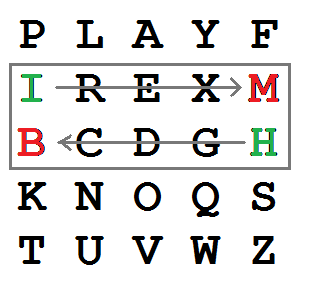
PFC requires generating a 5x5 key from a user-supplied keyword. You can see such a key in the picture above. It also works best if the plaintext (text to be encrypted) consists purely of uppercase letters, without any double-letter pairs. In this assignment, you'll write functions to generate a PFC key from a user-supplied keyword, to turn an arbitrary ASCII text into a suitable plaintext for encryption by PFC, and to locate a letter in the key.
def makeKeyword( string ):
    """Given an arbitrary string, return a string consisting of its
    unique letters in order and in uppercase. Discard non-letters and
    duplicates. """

def keyLetterList( keyword ):
    """Return a list of the letters in keyword, followed by all other
    letters from the alphabet (excluding 'J').  Assuming that keyword
    was produced by makeKeyword(), this should be a list of 25 unique
    uppercase letters. """

def makeKey( string ):
    """Given a keyword, make a Playfair Cipher key.  A PFC key is a
    5x5 array with successive unique letters from the input key word
    followed by the remaining letters of the alphabet. """

def showKey( key ):
    """Display a PFC key as a 5x5 grid of uppercase letters."""
Here's some sample output to show how these functions should work.
>>> string = '123@#$*playa aa fa ir   89$%#@19'
>>> keyword = makeKeyword( string )
>>> keyword
'PLAYFIR'
>>> letters = keyLetterList( keyword )
>>> letters
['P', 'L', 'A', 'Y', 'F', 'I', 'R', 'B', 'C', 'D', 'E', 'G', 'H', 'K', 'M', 'N', 'O', 'Q', 'S', 'T', 'U', 'V', 'W', 'X', 'Z']
>>> key = makeKey( string )
>>> key
[['P', 'L', 'A', 'Y', 'F'], ['I', 'R', 'B', 'C', 'D'], ['E', 'G', 'H', 'K', 'M'], ['N', 'O', 'Q', 'S', 'T'], ['U', 'V', 'W', 'X', 'Z']]
>>> showKey( key )
P  L  A  Y  F
I  R  B  C  D
E  G  H  K  M
N  O  Q  S  T
U  V  W  X  Z
>>>
In my implementation makeKey( string ) actually calls makeKeyword() and keyLetterList() as steps toward creating the PFC key. showKey is just to display the key after creating it. You can define other subsidiary functions if you like, but must implement at least the functions above.
Part 2: As noted before, PFC works best if the plaintext (text to be encrypted) consists purely of uppercase letters, without any double-letter pairs. In this part of the assignment, you'll take an arbitrary ASCII text inputText and massage it to create a suitable input text for PFC. This involves the following steps:
def makePlayfairInputText( inputText, fillCharacter ):
    """Take an arbitrary ASCII text and massage it to make it into
    suitable input for encryption by PFC. That means to:
    1. turn it into uppercase;
    2. remove non-letters;
    3. separate double-letter pairs with the fill character;
    4. if the resulting text has odd length, pad on the right with the
       fill character.

    """
Here's how this looks in operation; we're using 'X' as the
fill character.
>>> text = """Fourscore and seven years ago ago our fathers
brought forth on this continent, a new nation, conceived
in Liberty, and dedicated to the proposition that all
men are created equal."""
>>> newText = makePlayfairInputText( text, 'X' )
>>> newText
'FOURSCOREANDSEVENYEARSAGOFOURSCOREANDSEVENYEARSAGOXOURFATHERSBROUGHTFORTHONTHISCONTINENTANEWNATIONCONCEIVEDINLIBERTYANDXDEDICATEDTOTHEPROPOSITIONTHATALXLMENARECREATEDEQUALX'
>>> string
'123@#$*playa aa fa ir   89$%#@19'
>>> makePlayfairInputText( string, 'X' )
'PLAYAXAXAFAIRX'
>>>
BTW: it's possible that this fails if the fill character itself occurs as a double letter digram in the text. Using 'X' this might happen if the text includes words like "antivaxxer", "doxxing", or "looksmaxxing." In a production version, I'd check if the repeating character was the same as the fill character and use a different fill character, maybe 'Q', in that case. You don't have to do this.
Part 3: The final part is writing a function to look for a character in the key. Remember that the key is a 5x5 list. You should return a tuple (row, col) where the character occurs in the key. If the character is 'J', return the location of 'I' in the key. Here's the header:
def findCharacterInKey( ch, key ):
    """Return the tuple (row, col) where ch.upper() appears in key.
    Print an error message if it's not in the key. Treat 'J' as 'I'."""
Here is some sample behavior of this function:
>>> showKey( key )
P  L  A  Y  F
I  R  B  C  D
E  G  H  K  M
N  O  Q  S  T
U  V  W  X  Z
>>> findCharacterInKey( 'Z', key )
(4, 4)
>>> findCharacterInKey( 'Q', key )
(3, 2)
>>> findCharacterInKey( '$', key )
Character not in key: $
>>> findCharacterInKey( 'a', key )
(0, 2)
>>> findCharacterInKey( 'j', key )
(1, 0)
>>>
To encrypt a message, one would break the message into digrams (groups of 2 letters) such that, for example, "HelloWorld" becomes "HE LL OW OR LD". These digrams will be substituted using the key table. Since encryption requires pairs of letters, messages with an odd number of characters usually append an uncommon letter, such as "X", to complete the final digram. The two letters of the digram are considered opposite corners of a rectangle in the key table. To perform the substitution, apply the following 4 rules, in order, to each pair of letters in the plaintext:To decrypt, use the inverse (opposite) of the two shift rules, selecting the letter to the left or upwards as appropriate. The last rule remains unchanged, as the transformation switches the selected letters of the rectangle to the opposite diagonal, and a repeat of the transformation returns the selection to its original state. The first rule can only be reversed by dropping any extra instances of the chosen insert letter, generally "X"s or "Q"s, that do not make sense in the final message when finished.
- If both letters are the same (or only one letter is left), add an "X" after the first letter. Encrypt the new pair and continue. Some variants of Playfair use "Q" instead of "X", but any letter, itself uncommon as a repeated pair, will do.
- If the letters appear on the same row of the table, replace them with the letters to their immediate right respectively (wrapping around to the left side of the row if a letter in the original pair was on the right side of the row).
- If the letters appear on the same column of the table, replace them with the letters immediately below respectively (wrapping around to the top side of the column if a letter in the original pair was on the bottom side of the column).
- If the letters are not on the same row or column, replace them with the letters on the same row respectively but at the other pair of corners of the rectangle defined by the original pair. The order is important; the first letter of the encrypted pair is the one that lies on the same row as the first letter of the plaintext pair.
Your file must compile and run before submission. It must also contain a header with the following format:
# Assignment: HW10
# File: Playfair.py
# Student:
# UT EID:
# Course Name: CS303E
#
# Date:
# Description of Program:

Functions are one of your most useful tools for managing the complexity of code. Strictly speaking, you can get by without them. But your code is likely to be an unreadable, unmaintainable jumble. Coding something as complicated as the Playfair Cipher without using functions would be crazy. Students often think that writing functions is a waste of time; they're wrong. Just the increase in clarity is well worth the effort.